Your FileMaker expertise. With an agent beside you.

Understand an unfamiliar solution. Fix the script in front of you. Build the next screen. Genie does it inside FileMaker, in the file you have open.

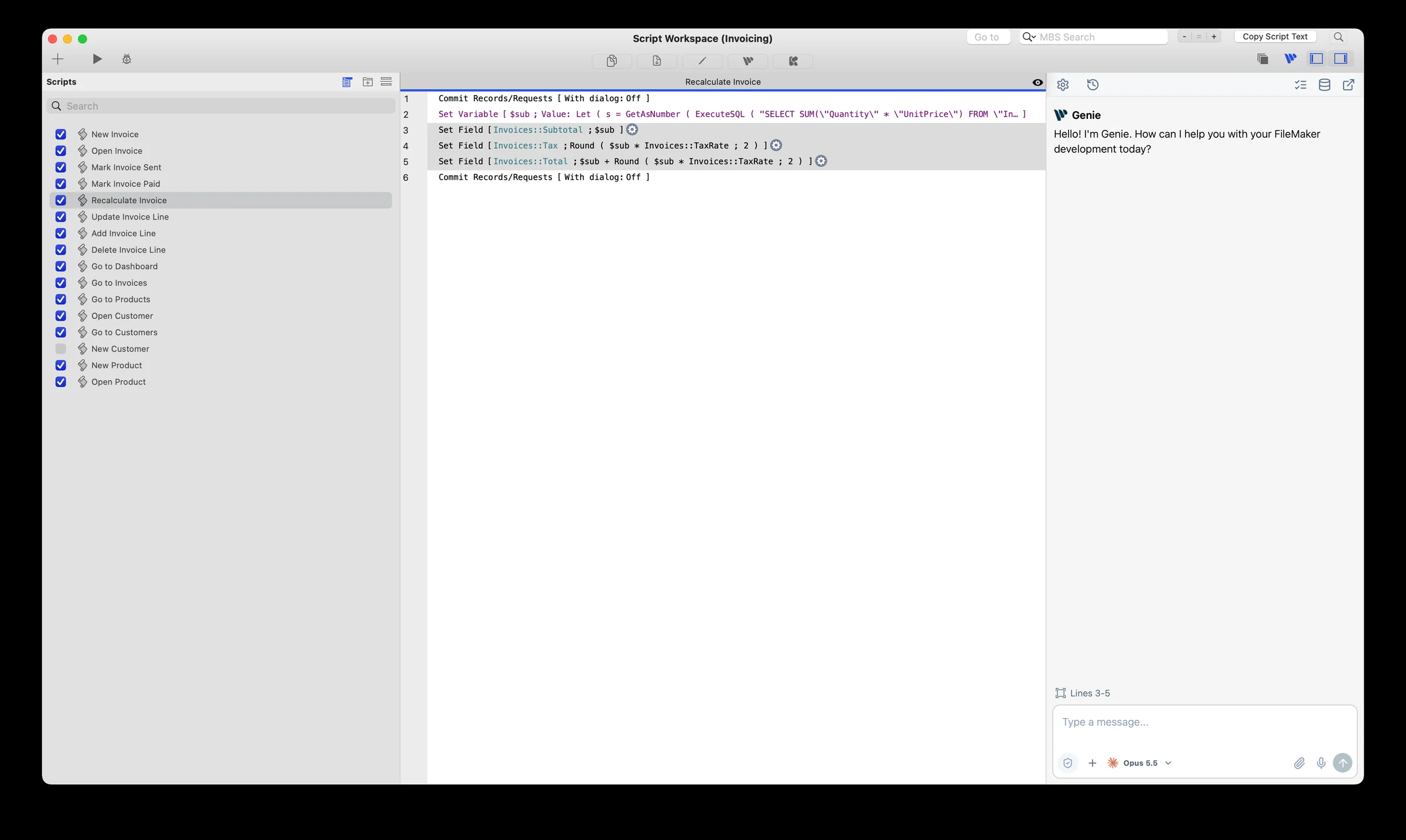
Script Workspace with the Genie panel docked on the right and script lines 3 to 5 selected
Genie docked in Script Workspace, with the selected lines in the conversation.

Everyone else hands you a snippet.

A chat assistant can write good FileMaker code. Then the work comes back to you: copy it, paste it, open Manage Database, drag the occurrences, set the match fields. Genie does that part in your file.

The jobCopying from an AI chatGenie
Understand a scriptYou paste the script in and explain your schema by hand.Genie reads the script, the fields and the layouts it touches, straight from the open file.
Fix a few linesYou get a rewritten script to paste back over the old one.Genie edits the lines you selected, in Script Workspace.
Change a layout objectIt describes the change. You make it in the Inspector.Genie makes the change on the object you selected.
Add a feature with new tablesIt lists the occurrences and relationships to create. You drag them onto the graph.Genie adds the table occurrences, draws the relationships and writes the script.
Stay in controlNothing touches your file, because it can’t reach it.Genie shows each change before applying it, or builds directly with Auto apply on.

Chat assistants with MCP connectors can reach further, and Genie’s Local MCP is how you give them FileMaker. FileMaker’s built-in AI script steps solve a different problem: AI features inside the solution you deliver.

From understanding the file to changing it.

Genie works where the change happens. Open a section to see what it can do there.

Work beside your layout.

Genie has its own tab in Layout mode, next to Fields, Objects and Add-ons. Select an object, ask about it or ask for a change, and keep the Inspector open while you work.

What it can do
  • Select an object and Genie knows exactly which one you mean.
  • Ask for a focused change: position, size, style. Everything you didn’t mention stays as it was.
  • Selecting a portal or a group targets that object, not everything inside it.
Read the guide

Keep the conversation beside your script.

Open Genie right in Script Workspace. Highlight lines and ask for a fix, start a new script from a sentence, or sort scripts into folders, without the conversation leaving your code.

What it can do
  • Highlight lines and Genie works on those lines. It reads the rest of the script when it needs to.
  • The selection updates when you click Refresh Selection, never behind your back.
  • Create folders and move scripts into them from the conversation.
Read the guide

Create a layout, then refine it.

Describe the screen. Genie builds it from your solution’s real fields and scripts, then you keep adjusting it in the conversation.

What it can do
  • Available on Mac, in local and hosted files, with a paid plan.
  • Check the result like any layout: field bindings, button actions, how it looks with real records.
  • Prefer to place it yourself? Copy the layout objects and paste them in Layout mode.
Read the guide

Work on the structure behind the screen.

Ask for the table occurrences, relationships and fields your feature needs. Genie adds them in the file, and you check the result in Manage Database.

What it can do
  • What Genie can change depends on your FileMaker version and your access privileges.
  • Not every field option or schema migration is covered yet.
  • With Auto apply on, edits to existing scripts and relationships can be undone from Workbench. New objects and data changes can’t, so test on a copy.
Read the guide

You decide how changes land.

Review every change before it’s applied, or turn on Auto apply and let Genie build directly.

Read the guide
Review first (default)

Genie shows you the change and waits for your OK. Right before writing, it checks the target again, so a script you edited in the meantime won’t get overwritten.

Turn on Auto apply

Genie builds directly, without asking at each step. The same permission and Privacy checks still apply, and running an existing script still asks first.

Know what you share. Choose what Genie can read.

Your prompt and the relevant FileMaker context go to the AI provider you configure. Privacy Mode narrows what Genie can read before that request is sent.

  1. Your FileMaker fileScripts, fields and other context
  2. Genie + your controlsRelevant reads; allowed selections in Privacy Mode
  3. Your selected providerReceives your prompt and permitted context

Limit what Genie reads

Turn on the chat shield and pick the allowed items in Metadata Explorer. Nothing selected means no live reads. Picking a table doesn’t pick all its fields.

Start fresh with the provider

Privacy Mode opens a new provider context. Earlier messages stay on your screen but aren’t sent again. What was already sent stays sent.

Set external access separately

Local MCP has its own Privacy setting. The chat shield doesn’t cover an external client, so set both if you use both.

Anything you type or paste is part of the request. Your provider’s retention and training terms still apply, so check them for your account.

How Privacy Mode works

Choose the model that fits your work.

Connect your own OpenAI, Anthropic, Google or xAI account, or configure a compatible local endpoint. Change models as your work changes.

OpenAIAnthropicGooglexAI

Usage is billed by your provider, not by Genie. Local models vary in tool and image support.

Set up your provider

Start with the setup you use.

Mac and Windows have separate packages. The panels in this tour are on Mac. Scripts and layouts can be written in local and hosted files.

Check requirements and download

Before you choose Genie

What can Genie change?

With a paid plan, Genie creates and edits scripts and layouts, adds tables, fields, table occurrences and relationships, sorts scripts into folders, and changes data. What’s available can vary with your FileMaker version and access privileges. Start with one focused change and check it in FileMaker.

Which platforms and FileMaker versions does Genie support?

Genie runs on Mac and Windows with FileMaker Pro 19 through 2026, as separate packages. The Layout mode and Script Workspace panels are on Mac today. The release notes list what each package includes.

Can I use a hosted FileMaker file?

Yes. Genie reads, writes scripts and builds layouts in hosted files as well as local ones, within your access privileges.

Do changes always need approval?

By default, yes: Genie shows each change and waits for your OK. Turn on Auto apply to let it build directly. Permission and Privacy checks stay on either way, and running an existing script always asks first.

Can I undo every change?

Not everything. With Auto apply on, edits to existing scripts, relationship edits and graph arrangements can be undone from Workbench. Newly created scripts, tables, fields, table occurrences and relationships can’t, and neither can data changes, so work on a development copy and check the result in FileMaker.

What is Free, and what is Paid?

Free covers exploring and asking: inspecting the file, read-only data questions, help with calculations, and Local MCP reads. Paid adds building: creating and editing in the file, and build requests from an external agent. Pricing starts at $59 per user per month or $499 per user per year, with seat discounts. Paid starts with 21 days free; billing begins after that, and you can cancel anytime.

Which AI provider do I use?

Connect your own OpenAI, Anthropic, Google or xAI account in Genie Settings, or a compatible local model. Your provider bills usage directly; your Genie licence doesn’t include it.

What context is shared?

Genie reads what the request needs, when it needs it. Your request and that context go to the provider you configured. Chat and Local MCP each have their own Privacy setting; use Metadata Explorer to limit exactly what Genie can read.

Where should I start?

Download the package for your platform, install it, connect a provider, and ask Genie to explain a script you know, without changing it. Then try a task from Build.

Try it on your own file.

Start free with a question about a script you know. Upgrade when you want Genie to build.